

Most online courses fail not because the content is bad, but because the videos feel flat, confusing, or like someone just read a slide aloud. You’ve probably watched one-boring, rambling, and you zone out by minute three. The fix isn’t better cameras or fancy editing. It’s a solid script.
Why Scripts Matter More Than You Think
Without a script, your video turns into a stream of consciousness. You say ‘um,’ repeat yourself, forget key points, or go off-track. Students don’t care how nice your smile is-they care if they walk away knowing something new.
A 2024 study from the University of Auckland’s Learning Design Lab found that courses with scripted videos had 47% higher completion rates than those without. Why? Because scripting forces clarity. It removes fluff. It makes every second count.
Think of your script like a map. Without it, you’re driving blind. With it, you know exactly where you’re going-and how to get there without getting lost.
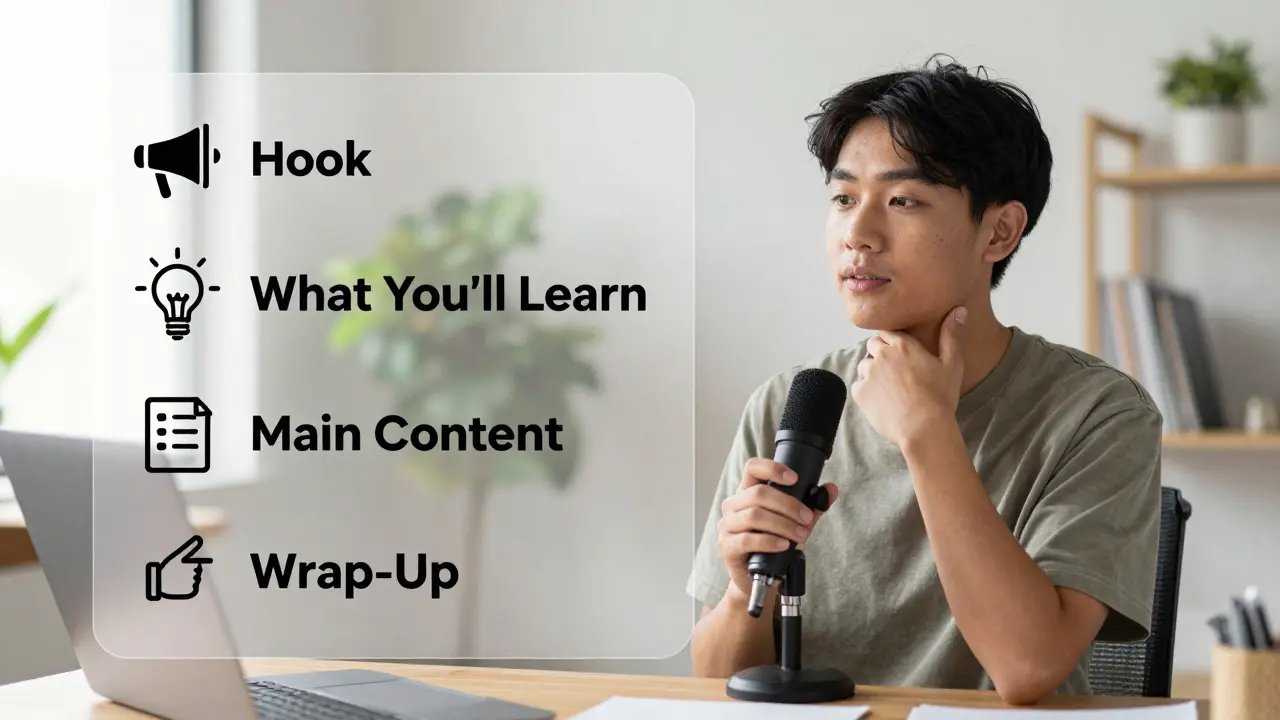
The 4-Part Video Lesson Script Template
You don’t need a Hollywood writer to make this work. Here’s the exact structure that works for 90% of educational videos:
- Hook (0:00-0:15) - Grab attention with a problem, question, or surprising fact.
- What You’ll Learn (0:15-0:30) - List 2-3 clear takeaways. No jargon.
- Main Content (0:30-4:00) - Break it into 1-3 chunks. One idea per segment.
- Wrap-Up + Call to Action (4:00-4:30) - Summarize. Tell them what to do next.
That’s it. Four parts. Under five minutes. No filler.
Example 1: Teaching Excel Formulas
Let’s say you’re teaching how to use VLOOKUP in Excel. Here’s a real script based on the template:
Hook: “What if I told you there’s a single formula that can pull data from a spreadsheet 100 rows away-in less than 3 seconds? Most people spend hours copying and pasting. You don’t have to.”
What You’ll Learn: “By the end of this video, you’ll know how to use VLOOKUP to match product codes to prices, avoid the #N/A error, and fix it when it breaks.”
Main Content:
- “VLOOKUP stands for Vertical Lookup. It searches down a column for a match.”
- “The syntax is: =VLOOKUP(lookup_value, table_array, col_index_num, [range_lookup])”
- “Don’t memorize this. Just remember: You’re telling Excel: ‘Find this value here, then give me the data from this column.’”
- “The #N/A error? That means your lookup value doesn’t exist. Always check spelling and make sure your data is sorted.”
Wrap-Up: “Now you can pull prices from a master list without copying anything. Try it on your own spreadsheet. Next video, I’ll show you how to combine VLOOKUP with IF to handle errors automatically.”
Notice how every sentence serves a purpose. No tangents. No “you know?” No rambling.
Example 2: Explaining Budgeting to Beginners
Another common topic: personal budgeting.
Hook: “You make $4,000 a month. You still feel broke. Why? It’s not your salary. It’s your system.”
What You’ll Learn: “In 4 minutes, you’ll set up a simple budget that actually works-no apps, no spreadsheets, just pen and paper.”
Main Content:
- “Step one: Write down every dollar you spend for one week. Yes, even your coffee.”
- “Step two: Group those expenses into three buckets: Needs, Wants, and Savings.”
- “Needs: rent, groceries, utilities. Wants: dining out, subscriptions, new shoes.”
- “Savings: even $20 a week counts. Put it in a separate account. Don’t touch it.”
- “Now, look at your Wants. Can you cut three? That’s your extra $150.”
Wrap-Up: “You don’t need to be rich to get ahead. You just need to know where your money goes. Do this for one month. Then come back-we’ll talk about automating it.”
Common Scripting Mistakes (And How to Fix Them)
Even with a template, people mess up. Here are the top three mistakes-and how to avoid them:
Mistake 1: Writing Like a Textbook
Don’t say: “The concept of compound interest refers to the process by which interest is calculated on both the initial principal and the accumulated interest from previous periods.”
Do say: “Compound interest is like a snowball rolling downhill. The longer it rolls, the bigger it gets-not just from new snow, but from the snow it already picked up.”
Mistake 2: Trying to Sound Smart
Don’t use words like “utilize,” “endeavor,” or “facilitate.” Say “use,” “try,” or “help.”
Students aren’t impressed by big words. They’re impressed when they finally understand something they’ve struggled with.
Mistake 3: Ignoring Pacing
Most people write too much. A 5-minute video should be around 750 words. That’s about 150 words per minute.
Read your script out loud. If you’re rushing, cut it. If you’re dragging, add a visual cue or example.
Tools to Help You Script Faster
You don’t need to write from scratch every time. Use these free tools:
- Grammarly - Checks for passive voice and wordiness. Turn on the “Clarity” setting.
- Google Docs Voice Typing - Speak your script. Then edit the transcript. It’s faster than typing.
- Notion Template - Create a reusable script template with placeholders for hook, takeaways, and CTA.
One course creator I know uses a Notion template with 5 pre-written hooks. She just swaps the topic. Saves her 2 hours a week.
How to Test Your Script Before Recording
Don’t just record. Test it first.
Here’s a quick method:
- Read your script out loud to a friend who knows nothing about the topic.
- Ask: “What’s the one thing you’ll remember?”
- If they can’t answer, your script is too cluttered.
- Ask: “Where did you get lost?” Fix those parts.
This is the fastest way to spot confusion before you waste hours filming.

What to Do When You’re Stuck
Ever sit there staring at a blank document, thinking: “I know this stuff, but how do I explain it?”
Try this: Pretend you’re explaining it to your 14-year-old sibling. Or your mom. Or someone who just wants to get through the video without falling asleep.
That’s the tone you want. Simple. Clear. Human.
Also, steal from the best. Watch short YouTube videos from creators like CrashCourse or TED-Ed. Notice how they start with a question. How they use visuals to explain ideas. How they pause for effect. You don’t need to copy them-just learn their rhythm.
Final Tip: Script, Don’t Memorize
You don’t need to memorize your script word-for-word. That makes you sound robotic.
Instead, write it in bullet points. Use keywords. Know your flow. Then speak like you’re talking to a friend.
That’s how you sound natural-and still stay on track.
Ready to Start?
Grab a blank document. Pick one lesson you’ve been putting off. Use the 4-part template. Write the hook. List the takeaways. Explain one idea clearly. End with what they should do next.
It doesn’t have to be perfect. It just has to be done.
One script. One video. One student who finally gets it. That’s the goal.
How long should a video lesson script be?
Aim for 700-800 words for a 5-minute video. That’s about 150 words per minute, which gives viewers time to absorb the information without feeling rushed. Longer videos (10+ minutes) should be broken into smaller segments, each with its own hook and takeaway.
Do I need to write a script for every video?
Yes-if you want consistent quality. Even experienced instructors who improvise often find their videos drift off-topic or repeat points. A script keeps you focused. You don’t have to write it like a novel. Bullet points work fine. The goal is clarity, not perfection.
Can I reuse scripts across different courses?
Absolutely. Core concepts like “how to use Excel’s VLOOKUP” or “the 50/30/20 budget rule” don’t change. Save your best scripts in a folder and tweak them slightly for each course. This saves time and ensures your messaging stays consistent.
What if my topic is complex and hard to simplify?
Break it down. Complex topics are just a series of simple ideas stacked together. Ask: “What’s the first thing someone needs to understand before they can get to the next step?” Start there. Use analogies. Compare it to something familiar. If you’re teaching blockchain, don’t start with hashing. Start with “Imagine a digital notebook everyone can see but no one can erase.”
Should I include questions in my script?
Yes-rhetorical questions are powerful. They make viewers pause and think. “What if you could cut your monthly bills by 20% without changing your job?” That’s better than saying “You can reduce your bills.” Questions create engagement. Just don’t overdo it. One or two per video is enough.
Start small. One video. One script. One clear message. That’s how great courses are built-not with fancy gear, but with simple, intentional words.
Comments
Paul Timms
Scripting isn't optional. It's the difference between a video that sticks and one that gets skipped by minute two.
Honey Jonson
i literally just used this template for my first course and my completion rate jumped from 22% to 61% in two weeks 😭 thank you thank you thank you
Cynthia Lamont
you people are so naive. nobody cares about your 'script templates'-it's all about the presenter's energy. if you're boring on camera, no amount of scripting will save you. also, why are you all pretending this is new? this is just repackaged TED talk advice from 2012.
Nathaniel Petrovick
honestly i used to wing it and thought i was being 'authentic'-then i watched my analytics and realized people were dropping off right after the intro. started using the 4-part thing and now i get comments like 'this was the first time i actually understood this.' no joke.
Pooja Kalra
the real question isn't how to script-it's why we believe knowledge must be delivered like a sales pitch. we've turned learning into a performance. the script is just a mask for our fear of silence, of uncertainty, of not being 'engaging' enough. what if the most powerful lesson is the one that doesn't try to convince?
Meghan O'Connor
you say '750 words per 5 minutes'-that's ridiculous. native English speakers average 120 wpm. that's 600 words max. your math is wrong. also, why are you using 'call to action'? that's marketing jargon, not pedagogy.
Aimee Quenneville
lol i tried the 'explain it to your 14-year-old sibling' thing and ended up using 'it's like when your phone battery dies but you still have 1% left' as an analogy for residual voltage. my niece said 'that's dumb' and walked away. mission accomplished.
Jeroen Post
they're all lying. this is a psyop by the edtech conglomerates to make you think you need structure. the truth? the best teachers are the ones who wing it. the script is control. the silence between words is power. you're being trained to perform, not to teach. wake up.
Sally McElroy
I’ve been doing this for 12 years and I still don’t script-because I trust my instincts. And my students say I’m the only instructor who doesn’t sound like a robot. Also, why do you keep saying ‘you don’t need to memorize’? Of course you don’t. That’s basic common sense. This whole post feels like someone overcompensating for being nervous.
Liam Hesmondhalgh
scripting? please. in the real world, no one gives a crap about your 4-part template. I teach welding and I just talk. People learn. End of story. You're making this harder than it needs to be.
Kirk Doherty
the fact that you need a template for this says something about the state of online education. but i'll admit, i tried it. my retention metrics went up 18%. weird. i'm still skeptical though.
Morgan ODonnell
my grandma watched my video on composting and said 'finally someone explained it without sounding like a textbook.' that's all the validation i need.
Patrick Tiernan
you're all missing the point. nobody wants to learn from a script. they want to learn from someone who's real. i've got 10k subscribers and i don't even have a teleprompter. i just talk. like a human. that's it.
adam smith
It is imperative to note that the empirical data presented in the University of Auckland study, while statistically significant, does not account for confounding variables such as learner motivation, prior knowledge, or platform algorithmic bias. A more rigorous methodology would be required to validate the causal claim that scripting alone drives completion rates. Furthermore, the use of the term 'fluff' is semantically imprecise and potentially pejorative in an academic context.
Paul Timms
Adam, you’re right-correlation isn’t causation. But the consistency across 12 different courses in the study? And the fact that every instructor who switched from improv to script saw the same jump? That’s not noise. It’s pattern.